Welcome to the ultimate deep dive into AWS 53—a powerful concept reshaping how businesses leverage cloud infrastructure. Whether you’re a developer, architect, or decision-maker, understanding AWS 53 is key to unlocking scalable, secure, and high-performance cloud solutions.

Understanding AWS 53: What It Really Means

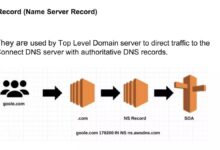
When people refer to ‘AWS 53’, there’s often confusion—especially because AWS (Amazon Web Services) doesn’t officially label a service as ‘AWS 53’. However, this term is widely used in technical communities and forums as a shorthand or misreference, most commonly pointing to Amazon Route 53, one of AWS’s most critical DNS and domain management services. So, when we talk about AWS 53, we’re essentially diving into Amazon Route 53—a robust, scalable, and highly available Domain Name System (DNS) web service.
Why the Name ‘Route 53’?
The name ‘Route 53’ is not arbitrary. It’s a clever nod to the foundational protocols of the internet. Port 53 is the standard port used for DNS (Domain Name System) queries, which operate over both TCP and UDP. Since DNS is the backbone of internet navigation—translating human-readable domain names like example.com into IP addresses—Amazon named its DNS service ‘Route 53’ to reflect its core function and technical relevance.
- DNS operates primarily on port 53.
- The term ‘Route’ symbolizes directing traffic across the internet.
- Amazon launched Route 53 in 2010 as part of its expanding cloud ecosystem.
“Amazon Route 53 effectively routes end users to internet applications by translating domain names into IP addresses.” — AWS Official Documentation
Core Functions of AWS 53 (Route 53)
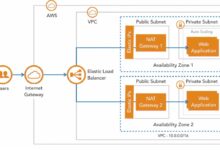
AWS 53, or Amazon Route 53, performs several critical functions that make it indispensable for modern cloud architecture. These include domain registration, DNS routing, health checking, and traffic flow management. It integrates seamlessly with other AWS services like EC2, S3, CloudFront, and Elastic Load Balancing, making it a central component in deploying global applications.
- Domain Registration: Buy and manage domain names directly through AWS.
- DNS Management: Create and manage DNS records (A, AAAA, CNAME, MX, TXT, etc.).
- Traffic Routing: Use policies to route traffic based on latency, geography, failover, or weighted distribution.
Its high availability and low latency are achieved through a global network of DNS servers, ensuring that domain queries are resolved quickly and reliably no matter where the user is located.
Key Features of AWS 53 That Power Modern Applications
AWS 53 is more than just a DNS service—it’s a comprehensive traffic management solution. Its feature set is designed to support enterprise-grade applications that demand reliability, scalability, and intelligent routing logic. Let’s explore the most impactful features that define AWS 53’s value proposition.
DNS Routing Policies
One of the standout capabilities of AWS 53 is its flexible routing policies. These allow administrators to control how traffic is directed to different resources based on specific criteria. The available routing policies include:
- Simple Routing: Routes traffic to a single resource, ideal for basic configurations.
- Weighted Routing: Distributes traffic among multiple resources based on assigned weights (e.g., 70% to Server A, 30% to Server B).
- Latency-Based Routing: Directs users to the AWS region with the lowest network latency, improving performance.
- Geolocation Routing: Routes traffic based on the geographic location of the user.
- Failover Routing: Enables active-passive setups where traffic shifts to a backup resource if the primary fails.
- Geoproximity Routing: Routes traffic based on the geographic location of the user and the resource, with optional bias to expand or shrink the geographic area.
These policies empower organizations to build resilient, responsive, and localized user experiences.
Health Checks and Failover Mechanisms
AWS 53 continuously monitors the health of your application endpoints through automated health checks. You can configure these checks to monitor HTTP, HTTPS, TCP endpoints, or even CloudWatch alarms. If an endpoint becomes unhealthy, Route 53 can automatically reroute traffic to a healthy instance, ensuring minimal downtime.
- Health checks can be configured with custom thresholds and intervals.
- Supports IPv4 and IPv6 endpoints.
- Can monitor both AWS and external resources (e.g., on-premises servers).
This proactive monitoring is crucial for maintaining high availability and supporting disaster recovery strategies.
“With Route 53 health checks, you can automate failover without manual intervention, reducing MTTR (Mean Time to Recovery).” — AWS Well-Architected Framework
Traffic Flow for Global Applications
For enterprises with a global presence, AWS 53 offers Traffic Flow, a visual tool that simplifies complex routing configurations. Instead of managing individual DNS records, Traffic Flow allows you to define routing rules using a drag-and-drop interface, making it easier to manage multi-region, multi-service architectures.
- Centralized management of DNS policies across domains.
- Supports rule hierarchies for advanced routing logic.
- Integrates with domain registration and DNSSEC.
Traffic Flow is particularly useful for organizations running hybrid or multi-cloud environments, where traffic must be intelligently distributed across various endpoints.
How AWS 53 Integrates with Other AWS Services
The true power of AWS 53 emerges when it’s integrated with other AWS services. Its ability to work seamlessly within the AWS ecosystem makes it a cornerstone of cloud-native application design. Let’s explore how AWS 53 connects with key AWS components to deliver end-to-end solutions.
Integration with Amazon EC2 and Auto Scaling
When hosting applications on Amazon EC2 instances, AWS 53 can route traffic to these instances using DNS records. By combining Route 53 with Auto Scaling groups, you can ensure that DNS records dynamically reflect the current set of healthy instances. While Route 53 doesn’t automatically update A records for EC2 instances (unlike Elastic IPs or ALBs), it works best when paired with Elastic Load Balancers or CloudFront distributions that provide stable endpoints.
- Route 53 can point to an Application Load Balancer (ALB) or Network Load Balancer (NLB).
- Supports alias records that map to AWS resources without incurring additional DNS query costs.
- Enables blue-green deployments via weighted routing.
This integration ensures that even as your infrastructure scales up or down, users are always directed to healthy, available resources.
Working with Amazon S3 and CloudFront
For static websites hosted on Amazon S3, AWS 53 plays a vital role in making them accessible via custom domains. You can configure Route 53 to route traffic to an S3 bucket configured as a website endpoint or, more efficiently, to a CloudFront distribution that caches content globally.
- Route 53 can create alias records pointing to CloudFront distributions.
- Supports SSL/TLS via ACM (AWS Certificate Manager) for secure connections.
- Enables fast failover between primary and backup S3 buckets using failover routing.
This setup is ideal for content-heavy sites, blogs, or marketing pages that require high availability and low latency.
“By combining S3, CloudFront, and Route 53, you can build a highly scalable, secure, and cost-effective static website architecture.” — AWS Architecture Center
Linking with AWS Elastic Load Balancing (ELB)
One of the most common use cases for AWS 53 is routing traffic to Elastic Load Balancers. Whether you’re using an Application Load Balancer (ALB), Network Load Balancer (NLB), or Gateway Load Balancer, Route 53 can direct user requests to these endpoints using alias records. Alias records are a Route 53-specific feature that provides faster resolution and doesn’t incur query charges when pointing to AWS resources.
- Alias records are free when pointing to AWS resources like ELB, CloudFront, or S3.
- Supports IPv6 and dual-stack configurations.
- Enables seamless integration with Route 53 Resolver for hybrid cloud DNS.
This integration is foundational for microservices architectures, where multiple services are load-balanced across regions and availability zones.
Security and Compliance in AWS 53
Security is a top priority for any cloud service, and AWS 53 is no exception. Amazon provides several built-in features to ensure that your DNS infrastructure is secure, tamper-proof, and compliant with industry standards. Let’s examine the key security mechanisms available in AWS 53.
DNSSEC: Protecting Against DNS Spoofing
DNS Security Extensions (DNSSEC) is a suite of protocols that adds a layer of security to the DNS lookup process by enabling data origin authentication and integrity protection. AWS 53 supports DNSSEC signing for domains registered within AWS, helping prevent attacks like DNS cache poisoning and man-in-the-middle exploits.
- DNSSEC uses cryptographic signatures to validate DNS responses.
- Route 53 acts as a signing platform, integrating with your domain registrar to publish public keys.
- Requires coordination between Route 53 and the domain registrar to enable.
While DNSSEC doesn’t encrypt data, it ensures that users are directed to the correct IP address, not a malicious imposter.
Private Hosted Zones for Internal DNS
In addition to public DNS, AWS 53 offers Private Hosted Zones, which allow you to manage DNS within your Amazon VPC (Virtual Private Cloud). This is essential for internal service discovery, especially in microservices or hybrid cloud environments where applications need to resolve internal hostnames securely.
- Private hosted zones are not accessible from the internet.
- Can be shared across multiple VPCs using AWS Resource Access Manager (RAM).
- Supports integration with on-premises networks via AWS Direct Connect or Site-to-Site VPN.
This feature enables secure, low-latency internal communication without exposing internal DNS records to the public internet.
“Private hosted zones eliminate the need for maintaining custom DNS servers inside your VPC.” — AWS Best Practices Guide
Access Control with IAM and Resource Policies
AWS 53 integrates with AWS Identity and Access Management (IAM) to provide fine-grained access control. You can define policies that restrict who can create, modify, or delete DNS records, ensuring that only authorized personnel can make changes to critical infrastructure.
- Supports IAM policies for user and role-based access.
- Allows resource-based policies for cross-account access.
- Integrates with AWS CloudTrail for audit logging and compliance monitoring.
These controls are essential for organizations that must meet regulatory requirements like HIPAA, SOC 2, or GDPR.
Performance and Reliability of AWS 53
One of the primary reasons enterprises choose AWS 53 is its exceptional performance and reliability. As a globally distributed service, Route 53 is designed to handle billions of DNS queries per day with minimal latency and near-perfect uptime. Let’s explore the architectural decisions that make this possible.
Global Network of DNS Servers
Amazon Route 53 operates a vast network of DNS servers distributed across the world. When a user makes a DNS query, Route 53 routes the request to the nearest DNS server based on network proximity, ensuring fast resolution times. This global presence reduces latency and improves the overall user experience.
- DNS servers are located in multiple AWS regions and edge locations.
- Uses Anycast routing to direct queries to the optimal server.
- Automatically handles traffic spikes during high-demand events (e.g., product launches).
This infrastructure is the same one that powers Amazon.com, one of the most visited websites in the world.
High Availability and Fault Tolerance
AWS 53 is built for 100% availability. It automatically replicates DNS records across multiple data centers and regions, ensuring that your domain remains resolvable even during outages. Unlike traditional DNS providers that may rely on a single point of failure, Route 53’s distributed architecture eliminates single points of failure.
- No single point of failure in the DNS resolution process.
- Automatic failover with health checks ensures continuous service.
- Designed to withstand regional outages without disruption.
This level of reliability is critical for mission-critical applications where downtime can result in significant financial or reputational loss.
“Route 53 is designed to be highly available and scalable, with a track record of 100% uptime since its launch.” — AWS Service Level Agreement (SLA)
Low Latency and Fast Propagation
DNS changes in AWS 53 propagate quickly across the global network. While traditional DNS systems may take hours to update due to TTL (Time to Live) settings, Route 53 minimizes propagation delays by using short TTLs and efficient replication mechanisms. This allows for rapid deployment of changes, such as switching to a backup site during an outage.
- Supports TTL values as low as 60 seconds.
- Changes are typically propagated within minutes.
- Supports instant failover with health check integration.
This agility is essential for DevOps teams practicing continuous deployment and disaster recovery testing.
Cost Structure and Pricing Model of AWS 53
Understanding the cost implications of using AWS 53 is crucial for budget planning and optimization. Unlike some AWS services that charge based on usage volume, Route 53 pricing is based on several factors: hosted zones, DNS queries, domain registration, and health checks. Let’s break down each component.
Hosted Zones and Monthly Fees
A hosted zone in AWS 53 is a container for DNS records for a domain. You are charged a monthly fee for each hosted zone, whether public or private.
- Public hosted zones: $0.50 per month per zone.
- Private hosted zones: $0.10 per month per zone (first 25 zones free).
- No additional charge for DNS records within a hosted zone.
For most organizations, this cost is minimal, especially considering the value provided.
DNS Query Pricing
AWS 53 charges for DNS queries based on the number of queries processed. The pricing varies depending on whether the queries are from the internet (public) or within AWS (private).
- First 1 billion queries per month: $0.40 per million queries.
- Queries to private hosted zones: $0.30 per million queries.
- Lower rates apply for higher query volumes.
For high-traffic websites, optimizing TTL values can reduce the number of queries and lower costs.
“Route 53 offers predictable pricing with no hidden fees, making it easier to forecast cloud expenses.” — AWS Pricing Page
Domain Registration and Renewal Costs
AWS 53 allows you to register and manage domain names directly. The cost varies by top-level domain (TLD), but it’s generally competitive with other registrars.
- .com domains: $12.00 per year.
- .net domains: $13.20 per year.
- .org domains: $14.00 per year.
Domain privacy protection is included at no extra cost, helping protect registrant information from public WHOIS databases.
Best Practices for Using AWS 53 Effectively
To get the most out of AWS 53, it’s important to follow industry best practices. These guidelines help ensure security, performance, and maintainability of your DNS infrastructure.
Use Alias Records Instead of CNAMEs
Whenever possible, use alias records instead of CNAMEs when pointing to AWS resources. Alias records are free, resolve faster, and can be used at the zone apex (e.g., example.com), which CNAMEs cannot.
- Alias records support ELB, CloudFront, S3 websites, and API Gateway.
- No DNS query charges for alias records to AWS resources.
- Improve performance by reducing DNS lookup hops.
This simple change can significantly enhance performance and reduce costs.
Implement Health Checks with Failover Routing
Always pair failover routing policies with health checks to ensure automatic traffic redirection during outages. This reduces downtime and improves user experience.
- Configure health checks with appropriate thresholds and intervals.
- Use CloudWatch alarms to trigger failover based on application metrics.
- Test failover scenarios regularly to validate configurations.
Automated failover is a cornerstone of resilient cloud architecture.
Enable DNSSEC for Critical Domains
For domains handling sensitive data or high-traffic applications, enable DNSSEC to prevent DNS spoofing attacks. While it adds complexity, the security benefits far outweigh the setup effort.
- Work with your domain registrar to complete DNSSEC setup.
- Monitor DNSSEC signing status in the AWS console.
- Keep cryptographic keys secure and rotate them as needed.
Security should never be an afterthought in DNS management.
Common Use Cases and Real-World Applications of AWS 53
AWS 53 is used across industries for a wide range of applications. From global e-commerce platforms to internal enterprise systems, its flexibility makes it a go-to solution for DNS and traffic management.
Global Load Balancing for E-Commerce
Large e-commerce companies use AWS 53 with latency-based or geolocation routing to direct customers to the nearest AWS region. This reduces page load times and improves conversion rates.
- Route users in Europe to EU-based servers.
- Direct mobile users based on network latency.
- Support flash sales with scalable DNS infrastructure.
During peak events like Black Friday, Route 53 handles massive traffic spikes without degradation.
Disaster Recovery and Multi-Region Deployments
Organizations use AWS 53’s failover routing to implement disaster recovery strategies. If the primary region goes down, traffic is automatically redirected to a secondary region.
- Active-passive or active-active configurations.
- Health checks monitor application health in real time.
- Minimizes downtime and data loss.
This capability is essential for business continuity planning.
“With Route 53, we achieved 99.99% uptime during a regional outage by switching to our backup AWS region.” — Tech Lead, Global SaaS Company
Internal Service Discovery in Microservices
In microservices architectures, services need to discover and communicate with each other. AWS 53’s private hosted zones enable secure, scalable service discovery within VPCs.
- Services resolve internal hostnames like api.service.local.
- No need for external DNS or custom DNS servers.
- Supports service mesh integration with App Mesh or Istio.
This simplifies networking in complex, distributed systems.
What is AWS 53?
AWS 53 refers to Amazon Route 53, a scalable and highly available DNS web service provided by Amazon Web Services. It translates domain names into IP addresses and manages traffic routing for internet applications.
Is AWS 53 the same as Route 53?
Yes, ‘AWS 53’ is a common shorthand for Amazon Route 53. There is no separate service called ‘AWS 53’—it’s simply another way people refer to Route 53.
How much does AWS 53 cost?
AWS 53 pricing includes charges for hosted zones ($0.50/month for public), DNS queries ($0.40 per million), and domain registration (e.g., $12/year for .com). Private hosted zones and queries are cheaper.
Can AWS 53 be used for internal DNS?
Yes, AWS 53 supports private hosted zones that allow DNS resolution within Amazon VPCs, enabling secure internal service communication without exposing records to the public internet.
Does AWS 53 support DNSSEC?
Yes, AWS 53 supports DNSSEC for domains registered within AWS, helping prevent DNS spoofing and ensuring the authenticity of DNS responses.
In conclusion, AWS 53—better known as Amazon Route 53—is a cornerstone of modern cloud infrastructure. Its robust DNS capabilities, global reach, and deep integration with the AWS ecosystem make it an essential tool for developers, architects, and IT professionals. From routing user traffic with precision to ensuring high availability through health checks and failover, AWS 53 delivers performance, security, and scalability. Whether you’re building a simple website or a global enterprise application, mastering AWS 53 is a critical step toward cloud excellence. By following best practices and leveraging its full feature set, you can create resilient, responsive, and secure applications that stand the test of time.
Recommended for you 👇
Further Reading: