Ever wished you could query massive datasets in seconds without managing servers? AWS Athena makes that dream a reality—offering serverless, lightning-fast SQL queries directly on data stored in S3. Let’s dive into how this powerful tool is reshaping cloud analytics.


What Is AWS Athena and How Does It Work?

AWS Athena is a serverless query service that allows you to analyze data directly in Amazon S3 using standard SQL. No infrastructure to manage, no clusters to provision—just point, query, and get results. It’s built on Presto, an open-source distributed SQL engine, and supports a wide range of data formats including CSV, JSON, Parquet, and ORC.
Serverless Architecture Explained
One of the most compelling features of AWS Athena is its serverless nature. This means you don’t need to launch or manage any servers. When you run a query, Athena automatically provisions the compute resources needed, executes the query, and shuts down when done.
- No need to set up or maintain clusters.
- You only pay for the queries you run, based on the amount of data scanned.
- Scaling is automatic—Athena handles thousands of concurrent queries seamlessly.
“Athena eliminates the operational overhead of managing infrastructure, allowing data teams to focus on insights, not servers.” — AWS Official Documentation
Integration with Amazon S3
Athena is deeply integrated with Amazon S3, making it ideal for querying data lakes. You simply store your data in S3, define a schema using the AWS Glue Data Catalog or create an external table, and start querying.
- Data remains in S3; Athena reads it in-place.
- Supports versioned, encrypted, and compressed files.
- Perfect for log analysis, IoT data, and historical archives.
For more details, visit the official AWS Athena page.
Key Features That Make AWS Athena a Game-Changer
AWS Athena isn’t just another query engine—it’s packed with features that make it a top choice for modern data analytics. From performance optimization to cost control, Athena delivers where it matters most.
Standard SQL Support
Athena uses a variant of standard SQL, making it accessible to analysts, data scientists, and engineers alike. You can perform complex joins, aggregations, subqueries, and even window functions without learning a new language.
- Familiar syntax reduces learning curve.
- Supports DDL (Data Definition Language) and DML (Data Manipulation Language).
- Compatible with JDBC/ODBC drivers for BI tool integration.
Support for Multiple Data Formats
Whether your data is structured, semi-structured, or unstructured, AWS Athena can handle it. It natively supports:
- CSV and TSV for tabular data.
- JSON and XML for nested, hierarchical data.
- Columnar formats like Parquet and ORC for high-performance analytics.
Using columnar formats can drastically reduce query costs and improve speed by minimizing the amount of data scanned.
Integration with AWS Glue Data Catalog
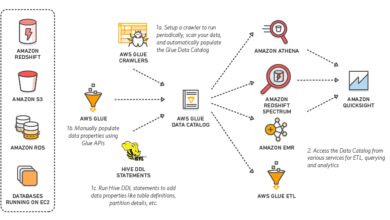
AWS Glue plays a crucial role in Athena’s ecosystem. The Glue Data Catalog acts as a central metadata repository, storing table definitions, schemas, and partition information.
- Automatically crawls S3 data to infer schema.
- Enables partitioning and compression detection.
- Allows sharing metadata across AWS services like EMR, Redshift, and Lambda.
Learn more about Glue integration at AWS Glue Documentation.
How to Get Started with AWS Athena: A Step-by-Step Guide
Setting up AWS Athena is straightforward. Whether you’re a beginner or an experienced cloud user, this guide will walk you through the essentials.
Step 1: Enable AWS Athena in Your Account
Before you can use Athena, you need to enable it in the AWS Management Console. Navigate to the Athena service, accept the default settings, and set up a query result location in S3.
- Create an S3 bucket (e.g.,
aws-athena-query-results-) to store output. - Ensure the bucket has proper encryption and access policies.
- Athena will use this location to save query results and metadata.
Step 2: Prepare Your Data in S3
Upload your dataset to an S3 bucket. Organize files logically—consider partitioning by date, region, or category to improve query performance.
- Use consistent naming conventions.
- Compress files using GZIP or Snappy to reduce storage and scan costs.
- Convert to Parquet or ORC for optimal performance.
Step 3: Create a Database and Table in Athena
Use the Athena console to create a database and define a table schema. You can do this manually or use AWS Glue to crawl your S3 path.
- Run
CREATE DATABASE my_analytics_db; - Then create a table with
CREATE EXTERNAL TABLEspecifying location, format, and schema. - Example:
CREATE EXTERNAL TABLE logs (timestamp STRING, user_id INT, action STRING) ROW FORMAT DELIMITED FIELDS TERMINATED BY ',' LOCATION 's3://my-bucket/logs/';
Optimizing AWS Athena Performance and Cost
While AWS Athena is powerful, inefficient queries can lead to high costs and slow performance. The key is optimization—both in data structure and query design.
Use Columnar Formats Like Parquet
Storing data in columnar formats such as Parquet or ORC can reduce query costs by up to 90%. Athena only scans the columns you reference, not the entire row.
- Convert CSV/JSON to Parquet using AWS Glue, Lambda, or EMR.
- Enable Snappy compression to reduce file size.
- Use partitioning to limit data scanned.
Partition Your Data Strategically
Partitioning divides your data into folders based on values like date, region, or category. Athena can skip entire partitions during queries, significantly reducing scan volume.
- Example:
s3://my-bucket/logs/year=2024/month=04/day=05/ - Use
MSCK REPAIR TABLEor Glue crawlers to update partition metadata. - Avoid over-partitioning, which can create too many small files.
Leverage Athena Query Federation
Athena Query Federation allows you to query data across multiple sources—including RDS, DynamoDB, and on-prem databases—using a single SQL statement.
- No need to move data; query in place.
- Use Lambda-based connectors for custom sources.
- Great for hybrid analytics and real-time joins.
Explore federation options at AWS Athena Federation Docs.
Real-World Use Cases of AWS Athena
AWS Athena isn’t just a toy for developers—it’s used by enterprises worldwide for mission-critical analytics. Let’s explore some practical applications.
Log Analysis and Security Monitoring
Companies use Athena to analyze application logs, VPC flow logs, CloudTrail events, and security logs stored in S3.
- Identify suspicious login attempts from CloudTrail.
- Analyze error rates in application logs.
- Monitor network traffic patterns using VPC logs.
Example query: SELECT sourceIPAddress, COUNT(*) FROM cloudtrail_logs WHERE eventTime LIKE '2024-04%' GROUP BY sourceIPAddress ORDER BY COUNT(*) DESC LIMIT 10;
E-Commerce Analytics
Retailers use Athena to analyze customer behavior, sales trends, and inventory data without building complex ETL pipelines.
- Query order history to identify top-selling products.
- Analyze user sessions from clickstream data.
- Combine data from multiple sources (S3, RDS) via federation.
IoT and Sensor Data Processing
IoT devices generate massive amounts of time-series data. Athena enables fast querying of this data for monitoring and alerting.
- Analyze temperature readings from sensors.
- Detect anomalies in device behavior.
- Aggregate data by time windows (hourly, daily).
Security and Access Control in AWS Athena
Security is paramount when dealing with sensitive data. AWS Athena integrates with IAM, encryption, and audit tools to ensure your data stays protected.
IAM Policies and Fine-Grained Access
You can control who can run queries, access specific databases, or view results using AWS Identity and Access Management (IAM).
- Grant permissions using policies like
athena:StartQueryExecution. - Restrict access to specific S3 buckets.
- Use tags to enforce resource-level permissions.
Data Encryption at Rest and in Transit
Athena supports both server-side and client-side encryption for data in S3.
- Enable SSE-S3, SSE-KMS, or SSE-C for S3 objects.
- Query results can be encrypted using KMS keys.
- All data in transit is encrypted via TLS.
Audit and Monitor with CloudTrail and CloudWatch
To maintain compliance, use AWS CloudTrail to log all Athena API calls and CloudWatch to monitor query performance.
- Track who ran which query and when.
- Set up alarms for long-running or expensive queries.
- Export logs to S3 for long-term retention.
Advanced AWS Athena Features You Should Know
Beyond basic querying, AWS Athena offers advanced capabilities that unlock deeper insights and greater flexibility.
Athena Machine Learning Integration
You can use Athena to prepare and query data for machine learning models. For example, extract training datasets and export them to SageMaker.
- Run SQL to clean and aggregate data.
- Save results as Parquet for model input.
- Use federated queries to enrich training data.
Result Reuse and Workgroup Management
Athena allows you to reuse query results within a workgroup, reducing redundant scans and saving costs.
- Enable result reuse for identical queries.
- Create workgroups to isolate teams and enforce budgets.
- Set data usage limits per workgroup.
Custom UDFs with Lambda
For complex logic not supported by SQL, you can create User-Defined Functions (UDFs) using AWS Lambda.
- Process data with Python or Java functions.
- Call UDFs directly in your SQL queries.
- Extend Athena’s capabilities beyond built-in functions.
Common Challenges and How to Solve Them
While AWS Athena is powerful, users often face challenges related to performance, cost, and complexity. Here’s how to overcome them.
High Query Costs Due to Full Scans
If your queries scan large amounts of data unnecessarily, costs can spiral. The solution? Optimize data layout and query structure.
- Convert to columnar formats.
- Partition by frequently filtered columns (e.g., date).
- Use
SELECT specific_columnsinstead ofSELECT *.
Slow Query Performance
Slow queries often result from poor data organization or lack of indexing (though Athena doesn’t support indexes).
- Use partitioning and bucketing.
- Limit result sets with
LIMIT. - Cache results for repeated queries.
Data Schema Evolution Issues
When source data changes (e.g., new columns), Athena tables may break. Use Glue Schema Registry or versioned schemas to manage evolution.
- Enable schema versioning in Glue.
- Use OpenFormat standards like Apache Avro.
- Regularly run crawlers to detect changes.
What is AWS Athena used for?
AWS Athena is used to run SQL queries directly on data stored in Amazon S3 without needing servers or complex infrastructure. It’s ideal for log analysis, ad-hoc querying, data lake analytics, and integrating with BI tools like Tableau or QuickSight.
Is AWS Athena free to use?
AWS Athena is not free, but it follows a pay-per-query model. You pay $5 per terabyte of data scanned. There’s no cost for storage or idle time, making it cost-effective for sporadic or lightweight querying.
How fast is AWS Athena?
Query speed depends on data size, format, and complexity. Athena can return results in seconds for small datasets (under 1 GB), while large scans may take minutes. Using Parquet, partitioning, and filtering can dramatically improve performance.
Can AWS Athena query DynamoDB or RDS?
Yes, using Athena Query Federation, you can query DynamoDB, RDS, and other data sources directly from Athena with SQL, without moving data. This is done via Lambda-based connectors.
How do I optimize AWS Athena costs?
To optimize costs: use columnar formats (Parquet/ORC), partition data, compress files, avoid SELECT *, and use workgroups to set usage limits. Monitoring with CloudWatch also helps identify expensive queries.
AWS Athena is a transformative tool for anyone dealing with large-scale data in the cloud. Its serverless architecture, SQL compatibility, and seamless S3 integration make it a go-to solution for modern analytics. By leveraging features like partitioning, federation, and cost controls, you can unlock insights quickly and efficiently. Whether you’re analyzing logs, running business reports, or feeding data to machine learning models, AWS Athena provides the speed, scalability, and simplicity needed to succeed in today’s data-driven world.
Recommended for you 👇
Further Reading: