Deploying applications on the cloud doesn’t have to be a headache. With AWS Beanstalk, developers get a powerful, flexible, and surprisingly simple way to launch and manage apps—without drowning in infrastructure details. Let’s dive into how this hidden gem of AWS can transform your deployment workflow.




What Is AWS Beanstalk and Why It Matters
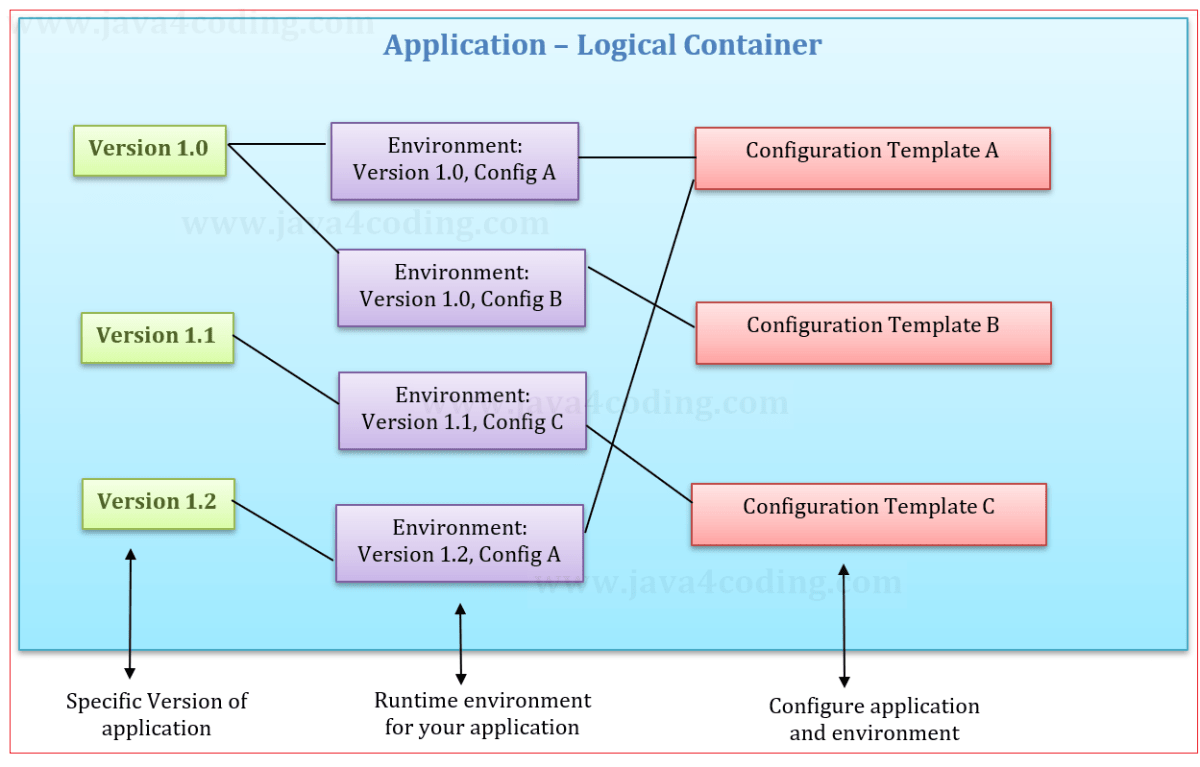
AWS Beanstalk is a Platform as a Service (PaaS) offering from Amazon Web Services that simplifies the deployment and management of web applications. Instead of configuring servers, load balancers, and databases manually, developers upload their code, and AWS Beanstalk automatically handles the deployment, scaling, and monitoring.
Core Concept Behind AWS Beanstalk
At its heart, AWS Beanstalk abstracts away the underlying infrastructure. You provide the application code—whether it’s in Python, Node.js, Ruby, Java, .NET, Go, or Docker—and Beanstalk takes care of the rest. It provisions the necessary AWS resources like EC2 instances, Auto Scaling groups, Elastic Load Balancers, and even database instances if needed.
- Developers focus solely on writing code.
- No need to manage OS patches, security updates, or server monitoring directly.
- Full control remains available if deeper customization is required.
“AWS Elastic Beanstalk enables you to focus on your application code rather than spending time managing the infrastructure.” — AWS Official Documentation
How AWS Beanstalk Fits Into the AWS Ecosystem
AWS Beanstalk isn’t a standalone service. It integrates seamlessly with other AWS components such as Amazon RDS for databases, CloudWatch for monitoring, S3 for storage, and IAM for security. This tight integration allows developers to build robust, scalable applications without leaving the AWS environment.
For example, when you deploy a WordPress site using AWS Beanstalk, it can automatically create an RDS MySQL instance, configure security groups, and set up logging via CloudWatch—all through simple configuration files or the web console.
Key Features That Make AWS Beanstalk Powerful
AWS Beanstalk stands out not because it reinvents the wheel, but because it smartly combines existing AWS services into a cohesive, developer-friendly experience. Its power lies in automation, flexibility, and integration.
Automatic Scaling and Load Balancing
One of the most compelling features of AWS Beanstalk is its ability to automatically scale your application based on traffic. You can define scaling policies based on CPU usage, network traffic, or custom CloudWatch metrics.
- During peak hours, Beanstalk spins up additional EC2 instances.
- When traffic drops, it scales down to save costs.
- Load balancing is enabled by default, distributing traffic evenly across instances.
This ensures high availability and performance without manual intervention. For startups or seasonal businesses, this dynamic scaling is a game-changer.
Zero-Downtime Deployments
Downtime during deployments is a common pain point. AWS Beanstalk solves this with multiple deployment strategies, including Rolling Updates, All at Once, and Immutable deployments.
- Rolling Updates: Gradually updates instances in batches, keeping the app online.
- Immutable: Launches a new set of instances with the updated code, swaps the environment, then terminates the old ones—ensuring zero downtime and rollback safety.
- Blue/Green Deployments: Supported via environment swapping, allowing full testing before cutover.
These strategies are crucial for production environments where uptime is non-negotiable.
How AWS Beanstalk Compares to Other AWS Services
While AWS offers several compute services—EC2, ECS, Lambda, Fargate—AWS Beanstalk occupies a unique middle ground between full control and full abstraction.
AWS Beanstalk vs EC2: Simplicity vs Control
Amazon EC2 gives you complete control over virtual servers. You manage everything: OS, patches, scaling, and networking. In contrast, AWS Beanstalk uses EC2 under the hood but automates most of the management.
- EC2: Best for custom infrastructure needs, legacy apps, or when you need root access.
- AWS Beanstalk: Ideal for developers who want to deploy apps quickly without managing infrastructure.
If you’re building a standard web app and don’t want to become a DevOps expert overnight, AWS Beanstalk is the smarter choice.
AWS Beanstalk vs ECS and Fargate
Amazon ECS (Elastic Container Service) and Fargate are designed for containerized applications. They offer more granular control over Docker containers and are better suited for microservices architectures.
- AWS Beanstalk: Supports Docker but is more opinionated and easier to use for monolithic apps.
- ECS/Fargate: Better for complex, distributed systems with many services.
For teams just starting with containers, AWS Beanstalk provides a gentler learning curve while still supporting Docker deployments.
Supported Platforms and Languages in AWS Beanstalk
AWS Beanstalk supports a wide range of programming languages and platforms out of the box, making it accessible to diverse development teams.
Officially Supported Runtimes
AWS maintains preconfigured platforms for popular stacks:
- Java (Tomcat, Java SE)
- Node.js
- Python (including WSGI for Django/Flask)
- Ruby (with Passenger)
- .NET on Windows Server or Linux
- PHP (Apache or Nginx)
- Go
- Docker (single container or multicontainer with Docker Compose)
Each platform comes with a default configuration, so you can deploy a Flask app or a React frontend with Node.js in minutes.
Custom Platforms and Docker Flexibility
If your app uses a runtime not officially supported, AWS Beanstalk allows custom platforms using Packer and Amazon Machine Images (AMIs). Alternatively, you can package your app in a Docker container and deploy it as a custom platform.
This flexibility means you’re not locked into AWS’s predefined stacks. You can run legacy versions, experimental frameworks, or even machine learning models as long as they fit in a container.
Setting Up Your First AWS Beanstalk Application
Getting started with AWS Beanstalk is straightforward. Whether you use the AWS Management Console, CLI, or SDKs, the process is designed to be intuitive.
Step-by-Step Deployment via AWS Console
1. Log in to the AWS Management Console.
2. Navigate to Elastic Beanstalk.
3. Click “Create Application.”
4. Enter a name and description.
5. Choose a platform (e.g., Node.js).
6. Upload your code (ZIP file or from S3).
7. Configure environment (e.g., web server, load balancing).
8. Launch.
Within minutes, your app is live with a public URL like myapp.us-east-1.elasticbeanstalk.com.
Using the EB CLI for Local Development
The Elastic Beanstalk Command Line Interface (EB CLI) streamlines local development. After installing it via pip:
eb init: Initializes your directory with Beanstalk settings.eb create: Creates a new environment.eb deploy: Deploys updated code.eb open: Opens the app in your browser.
This workflow integrates smoothly with Git and CI/CD pipelines, making it ideal for agile teams.
Configuration and Customization Options
While AWS Beanstalk automates much of the infrastructure, it doesn’t lock you out. You can customize nearly every aspect using configuration files, environment variables, and AWS services.
Using .ebextensions for Advanced Configuration
The .ebextensions folder in your project allows you to define configuration files in YAML or JSON format. These files can:
- Install packages via yum or apt.
- Run scripts during deployment.
- Modify nginx or Apache configurations.
- Set up cron jobs.
- Configure SSL certificates.
For example, a .ebextensions/01_setup.config file can install ImageMagick for image processing:
packages:
  yum:
    ImageMagick: []
This level of control ensures Beanstalk can handle complex app requirements without sacrificing automation.
Environment Variables and Secure Parameter Storage
Sensitive data like API keys and database passwords should never be hardcoded. AWS Beanstalk allows you to set environment variables through the console or CLI.
For enhanced security, integrate with AWS Systems Manager Parameter Store or AWS Secrets Manager. These services encrypt secrets and provide fine-grained access control via IAM roles.
This separation of configuration from code follows the 12-factor app methodology and improves security and portability.
Monitoring, Logging, and Debugging in AWS Beanstalk
Even the best-deployed apps can fail. AWS Beanstalk provides robust tools for monitoring performance, accessing logs, and diagnosing issues.
Integrated CloudWatch Monitoring
Every Beanstalk environment sends metrics to Amazon CloudWatch, including:
- CPU utilization
- Network in/out
- Request count
- Latency
- HTTP 5xx errors
You can create alarms that trigger notifications or auto-scaling actions. For example, if CPU usage exceeds 80% for 5 minutes, CloudWatch can trigger a scaling event.
Accessing Application and System Logs
Logs are crucial for debugging. AWS Beanstalk allows you to:
- View recent logs directly in the console.
- Download full logs (application, system, and deployment).
- Stream logs in real-time using the EB CLI (
eb logs --stream). - Enable log rotation and export to S3 for long-term storage.
For Node.js apps, console.log output appears in the logs. For Python, print statements and logging module output are captured.
Best Practices for Using AWS Beanstalk in Production
To get the most out of AWS Beanstalk, follow these proven best practices that ensure reliability, security, and cost-efficiency.
Use Immutable Deployments for Safety
Immutable deployments create a fresh environment for each release. If something goes wrong, you can instantly roll back by swapping back to the previous environment. This eliminates configuration drift and reduces risk.
Enable immutable deployments in the environment configuration. It costs slightly more (due to temporary duplicate instances), but the safety is worth it for critical apps.
Enable VPC Integration for Security
By default, Beanstalk environments run in a default VPC. For production apps, place your environment in a custom VPC with private subnets for EC2 instances and public subnets for load balancers.
- Private instances can’t be accessed directly from the internet.
- Database instances (like RDS) should also reside in private subnets.
- Use security groups to control traffic between layers.
This architecture follows AWS security best practices and protects against unauthorized access.
Optimize Costs with Auto Scaling and Instance Types
Beanstalk environments can become expensive if not managed. Use:
- Auto Scaling to match capacity with demand.
- Spot Instances for non-critical workloads (via custom AMIs and Auto Scaling groups).
- Smaller instance types during development (e.g., t3.micro).
- Shutdown environments when not in use (e.g., staging environments after hours).
You can also use AWS Cost Explorer to track spending per environment and set budgets.
Common Pitfalls and How to Avoid Them
Even experienced developers run into issues with AWS Beanstalk. Knowing these common pitfalls can save you hours of debugging.
Ignoring .ebextensions Syntax Errors
A single YAML indentation error in a .ebextensions file can cause deployment failures. The error might not be obvious in the console.
Solution: Validate YAML syntax before deploying. Use tools like YAML Lint or IDE plugins. Check the eb-engine.log file in the logs for detailed error messages.
Overlooking Environment Health
Beanstalk reports environment health as Green, Yellow, or Red. Ignoring yellow warnings can lead to red outages.
- Green: All instances healthy.
- Yellow: Some issues (e.g., high CPU, deployment delays).
- Red: Application errors or instance failures.
Set up SNS notifications for health changes so you can respond quickly.
Hardcoding Configuration in Code
Never store database passwords, API keys, or environment-specific URLs in your source code. Use environment variables or AWS Secrets Manager instead.
This ensures your app works across development, staging, and production without code changes.
Scaling Strategies for High-Traffic Applications
AWS Beanstalk excels at scaling, but you need to configure it properly for high-traffic scenarios.
Vertical vs Horizontal Scaling
Beanstalk supports both:
- Vertical Scaling: Upgrade instance types (e.g., from t3.medium to c5.xlarge).
- Horizontal Scaling: Add more instances based on load.
Horizontal scaling is generally preferred because it’s more fault-tolerant. If one instance fails, others continue serving traffic.
Using Application Load Balancer (ALB) for Better Routing
For modern applications, switch from Classic Load Balancer to Application Load Balancer (ALB). ALB supports:
- Path-based routing (e.g., /api to one backend, /static to another).
- HTTP/2 and WebSocket support.
- Integration with AWS WAF for security.
ALB provides better performance and flexibility for complex apps.
Integrating AWS Beanstalk with CI/CD Pipelines
Automating deployments is key to modern DevOps. AWS Beanstalk integrates smoothly with CI/CD tools.
Using AWS CodePipeline and CodeBuild
You can create a pipeline that:
- Triggers on Git push (via CodeCommit, GitHub, or Bitbucket).
- Builds the app using CodeBuild.
- Deploys to Beanstalk using CodeDeploy (or direct EB deploy).
This fully automated workflow ensures consistent, repeatable deployments.
GitHub Actions for Beanstalk Deployments
For teams using GitHub, GitHub Actions can deploy to AWS Beanstalk. A sample workflow:
name: Deploy to AWS Beanstalk
on:
  push:
    branches: [ main ]
jobs:
  deploy:
    runs-on: ubuntu-latest
    steps:
      - uses: actions/checkout@v2
      - name: Configure AWS Credentials
        uses: aws-actions/configure-aws-credentials@v1
        with:
          aws-access-key-id: ${{ secrets.AWS_ACCESS_KEY_ID }}
          aws-secret-access-key: ${{ secrets.AWS_SECRET_ACCESS_KEY }}
          aws-region: us-east-1
      - name: Deploy to Beanstalk
        run: |
          aws elasticbeanstalk create-deployment-package...
          aws elasticbeanstalk update-environment --application-name myapp --environment-name myapp-prod --version-label $GITHUB_SHA
This enables seamless integration between development and deployment.
Real-World Use Cases of AWS Beanstalk
AWS Beanstalk is used by startups, enterprises, and government agencies alike. Here are some real-world scenarios where it shines.
Startup MVP Deployment
Startups need to launch fast with minimal DevOps overhead. AWS Beanstalk allows a solo developer to deploy a full-stack app in hours, not weeks. As traffic grows, Beanstalk scales automatically—no need to hire a DevOps team immediately.
Enterprise Application Modernization
Large companies often have legacy Java or .NET applications. Instead of rewriting them for microservices, they can containerize or deploy them directly on Beanstalk, gaining cloud benefits without a full rewrite.
Seasonal Traffic Handling (e.g., E-commerce)
Retailers face massive traffic spikes during holidays. With Beanstalk’s auto-scaling, they can handle Black Friday traffic seamlessly and scale down afterward, optimizing costs.
What is AWS Beanstalk used for?
AWS Beanstalk is used for deploying and managing web applications in the cloud without managing the underlying infrastructure. It automates provisioning, scaling, and monitoring, supporting languages like Java, Python, Node.js, and Docker.
Is AWS Beanstalk free to use?
No, AWS Beanstalk itself is free, but you pay for the underlying AWS resources it uses (EC2, S3, RDS, etc.). There are no additional charges for using Beanstalk.
How does AWS Beanstalk differ from AWS Lambda?
Beanstalk runs long-lived applications on servers (or containers), while Lambda runs event-driven, short-lived functions. Lambda is serverless and scales to zero; Beanstalk is better for persistent apps like websites.
Can I use Docker with AWS Beanstalk?
Yes, AWS Beanstalk supports both single-container and multi-container Docker environments using Docker Compose, making it flexible for containerized applications.
How do I troubleshoot a failed deployment in AWS Beanstalk?
Check the environment health dashboard, view logs via the EB CLI (eb logs), and inspect eb-engine.log for deployment errors. Also, validate .ebextensions syntax and ensure IAM roles have proper permissions.
AWS Beanstalk is a powerful, often underappreciated tool in the AWS ecosystem. It strikes a perfect balance between ease of use and control, making it ideal for developers who want to deploy applications quickly without sacrificing scalability or security. From startups to enterprises, its automation, integration, and flexibility offer real value. By following best practices—like using immutable deployments, integrating with VPC, and setting up CI/CD—you can harness its full potential. Whether you’re launching an MVP or modernizing legacy apps, AWS Beanstalk remains a smart, efficient choice for cloud deployment.
Recommended for you 👇
Further Reading: