If you’re tired of manually configuring cloud resources, AWS CDK might just be the game-changer you’ve been waiting for. This revolutionary tool turns infrastructure into code—real, reusable, and readable code.

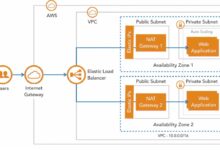


What Is AWS CDK and Why It’s a Game-Changer

AWS CDK, or Amazon Web Services Cloud Development Kit, is an open-source software development framework that allows developers to define cloud infrastructure using familiar programming languages. Unlike traditional Infrastructure as Code (IaC) tools that rely on declarative configuration files (like JSON or YAML), AWS CDK uses imperative code in languages such as TypeScript, Python, Java, C#, and Go.
How AWS CDK Differs from Traditional IaC Tools
Traditional tools like AWS CloudFormation or Terraform require writing configuration files that describe the desired state of your infrastructure. While effective, these files can become verbose, hard to maintain, and lack the flexibility of real programming constructs.
- AWS CDK uses real programming languages, enabling loops, conditionals, and functions.
- It compiles down to AWS CloudFormation templates under the hood.
- Developers can leverage IDEs, debuggers, and testing frameworks for infrastructure code.
This means you can apply software engineering best practices—like modularity, encapsulation, and unit testing—to your infrastructure.
“With AWS CDK, infrastructure is no longer a side effect of development—it becomes a first-class citizen.” — AWS Official Documentation
Supported Programming Languages and SDKs
One of the biggest strengths of AWS CDK is its multi-language support. You can choose the language you’re most comfortable with:
- TypeScript: The most mature and widely used option, with excellent tooling support.
- Python: Ideal for data engineers and DevOps teams already using Python scripts.
- Java: Great for enterprise environments with strong Java ecosystems.
- C# (.NET): Perfect for Windows-based development teams.
- Go: Lightweight and fast, suitable for performance-critical deployments.
Each language has its own CDK construct library and integrates seamlessly with AWS SDKs, making it easy to interact with services programmatically. You can learn more about language support on the official AWS CDK documentation.
Core Concepts of AWS CDK: Stacks, Constructs, and Apps
To truly master AWS CDK, you need to understand its foundational building blocks: Stacks, Constructs, and Apps. These abstractions allow you to model your infrastructure in a hierarchical and reusable way.
Understanding Stacks in AWS CDK
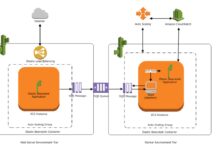
A Stack in AWS CDK represents a unit of deployment—essentially a CloudFormation stack. Each stack contains a collection of AWS resources that are deployed together. For example, you might have one stack for your VPC, another for your EC2 instances, and a third for your RDS databases.
- Stacks can be deployed independently or as part of a larger application.
- You can define multiple stacks within a single CDK app, enabling multi-environment setups (dev, staging, prod).
- Each stack maps directly to a CloudFormation stack, giving you full visibility and control via the AWS Console.
Here’s a simple example in TypeScript:
export class MyVpcStack extends cdk.Stack {
  constructor(scope: cdk.Construct, id: string, props?: cdk.StackProps) {
    super(scope, id, props);
    new ec2.Vpc(this, 'MyVpc', { maxAzs: 3 });
  }
}
This creates a VPC within a dedicated stack, promoting separation of concerns and easier management.
What Are Constructs and Why They Matter
Constructs are the fundamental building blocks of AWS CDK. A construct represents a cloud component—anything from a single S3 bucket to an entire serverless API with Lambda, API Gateway, and DynamoDB.
- Constructs are reusable, composable, and can encapsulate complex patterns.
- There are three levels of constructs: L1 (Cfn Resources), L2 (pre-configured resources), and L3 (patterns).
- You can create your own constructs to standardize infrastructure across teams.
For instance, instead of defining a Lambda function, IAM role, and API Gateway separately every time, you can create a higher-level construct called ApiLambdaStack that bundles them together.
“Constructs turn infrastructure into lego-like components you can snap together.” — AWS CDK Developer Guide
Building Your First CDK App
A CDK App is the root of your infrastructure definition. It’s the entry point that synthesizes all your stacks into CloudFormation templates.
- An app can contain multiple stacks, each representing a different environment or service.
- The app uses the CDK Toolkit (
cdkCLI) to deploy, diff, and manage infrastructure. - You can run tests on your app before deployment to catch errors early.
Here’s how to initialize a basic CDK app in TypeScript:
const app = new cdk.App();
new MyVpcStack(app, 'VpcStackDev', { env: { region: 'us-east-1' } });
new MyVpcStack(app, 'VpcStackProd', { env: { region: 'us-west-2' } });
app.synth();
This defines two instances of the same stack for different environments, showcasing the power of code reuse.
Setting Up Your AWS CDK Development Environment
Before you start building with AWS CDK, you need to set up your local development environment. This includes installing the CDK CLI, configuring AWS credentials, and choosing your preferred programming language.
Installing the AWS CDK CLI
The AWS CDK Command Line Interface (CLI) is the primary tool for interacting with your CDK apps. It allows you to initialize projects, synthesize templates, deploy stacks, and view diffs.
- Install Node.js (required for the CDK CLI).
- Run
npm install -g aws-cdkto install the CLI globally. - Verify installation with
cdk --version.
Once installed, you can use commands like cdk init, cdk deploy, and cdk diff to manage your infrastructure lifecycle.
Configuring AWS Credentials and Permissions
To deploy resources, AWS CDK needs permission to create and manage AWS services. This is done through IAM roles and credentials.
- Use the AWS CLI to configure credentials:
aws configure. - Ensure your IAM user has sufficient permissions (e.g.,
AdministratorAccessfor learning, or custom policies in production). - Consider using AWS SSO or temporary credentials for enhanced security.
You can also specify profiles for different environments:
cdk deploy --profile dev-accountThis allows you to switch between AWS accounts seamlessly.
Initializing a New CDK Project
Creating a new CDK project is straightforward. Use the cdk init command to scaffold a project in your language of choice.
cdk init app --language typescriptcreates a TypeScript project.- The command generates essential files:
bin/,lib/,package.json, andcdk.json. - Run
npm installto install dependencies.
After initialization, you can start defining your stacks and constructs. The AWS CDK Getting Started Guide provides detailed walkthroughs for each language.
Writing Infrastructure Code with AWS CDK
Now that your environment is ready, it’s time to write actual infrastructure code. AWS CDK makes this intuitive by letting you define resources using object-oriented programming principles.
Defining Resources Using Constructs
In AWS CDK, every AWS resource is represented as a construct. You instantiate these constructs within your stack to define your infrastructure.
- Use L2 constructs (like
s3.Bucketorlambda.Function) for common resources with sensible defaults. - Use L1 constructs (like
CfnBucket) when you need low-level access to CloudFormation properties. - Pass configuration options via props objects.
Example: Creating an S3 bucket with versioning enabled:
new s3.Bucket(this, 'MyBucket', {
  versioned: true,
  encryption: s3.BucketEncryption.S3_MANAGED,
  removalPolicy: cdk.RemovalPolicy.RETAIN
});
This code is far more readable and maintainable than raw JSON or YAML.
Leveraging Higher-Level Constructs and Patterns
AWS CDK includes higher-level constructs known as patterns that encapsulate common architectural designs.
aws-apigateway.LambdaRestApi: Deploys a Lambda function behind an API Gateway with one line.aws-ecs-patterns.ApplicationLoadBalancedFargateService: Sets up a complete Fargate service with load balancer and auto-scaling.aws-lambda-nodejs.NodejsFunction: Automatically bundles Node.js code and dependencies.
These patterns drastically reduce boilerplate and accelerate development. For example:
new lambdaNodejs.NodejsFunction(this, 'MyHandler', {
  entry: 'src/handler.ts',
  handler: 'handler'
});
This single line compiles TypeScript, bundles dependencies, and creates a Lambda function—no manual packaging needed.
Managing Configuration with Context and Parameters
Real-world applications require different configurations across environments (dev, staging, prod). AWS CDK provides several ways to manage this.
- Use
contextincdk.jsonto pass static values. - Use
cdk.Contextto retrieve values like availability zones or account IDs. - Pass environment-specific props when instantiating stacks.
Example: Using context to set environment name:
// cdk.json
{
  "context": {
    "envName": "dev"
  }
}

// In stack
const envName = this.node.tryGetContext('envName');
You can override context at deploy time: cdk deploy -c envName=prod.
Deploying and Managing Infrastructure with CDK CLI
Once your infrastructure code is written, the CDK CLI becomes your primary tool for deployment and management. It provides powerful commands for previewing changes, deploying stacks, and inspecting the state of your cloud environment.
Synthesizing Templates with cdk synth
The cdk synth command translates your CDK code into AWS CloudFormation templates. This is a crucial step that allows you to inspect the generated JSON before deployment.
- Run
cdk synthto generate templates in thecdk.out/directory. - Review the output to ensure resources are defined correctly.
- Use this for CI/CD pipelines where you want to separate synthesis from deployment.
This transparency ensures you’re never deploying blindly—what you see is what gets deployed.
Deploying Stacks with cdk deploy
The cdk deploy command deploys your stacks to AWS. It handles the entire CloudFormation workflow, including stack creation or updates.
- Run
cdk deploy MyStackto deploy a specific stack. - Add
--require-approval neverto skip manual approval in automated environments. - Use
--hotswapfor faster deployments when only Lambda code changes.
The CLI provides real-time feedback during deployment, showing progress and any errors.
Inspecting Changes with cdk diff
Before making changes to your infrastructure, it’s critical to understand what will be modified. The cdk diff command shows a human-readable comparison between your current code and the deployed stack.
- Run
cdk diffto see added, removed, or modified resources. - Color-coded output highlights dangerous changes (e.g., resource replacement).
- Integrate
cdk diffinto pull request workflows to enforce code reviews.
This prevents accidental deletions or configuration drift.
Best Practices for Using AWS CDK in Production
While AWS CDK is powerful, using it effectively in production requires adherence to best practices. These include organizing code, managing secrets, and implementing CI/CD pipelines.
Organizing Code with Modular Constructs
As your infrastructure grows, it’s essential to keep your codebase maintainable. Break down your infrastructure into reusable, domain-specific constructs.
- Create constructs for common patterns (e.g., secure VPCs, logging pipelines).
- Store shared constructs in a private npm or Python package repository.
- Use namespaces and clear naming conventions.
This promotes consistency across teams and reduces duplication.
Managing Secrets and Sensitive Data
Never hardcode secrets in your CDK code. Instead, use AWS Secrets Manager or SSM Parameter Store.
- Reference secrets using
SecretValue.secretsManager(). - Use
cdk.SecretValueto pass credentials securely. - Avoid storing sensitive data in Git—even in environment variables.
Example:
const dbPassword = cdk.SecretValue.secretsManager('my-db-secret');
new rds.DatabaseInstance(this, 'Database', {
  credentials: { username: 'admin', password: dbPassword }
});
Implementing CI/CD Pipelines with AWS CDK
Automate your infrastructure deployments using CI/CD tools like GitHub Actions, AWS CodePipeline, or Jenkins.
- Synthesize and test CDK apps in CI before deployment.
- Use self-mutating pipelines that deploy themselves.
- Enforce approval stages for production deployments.
AWS provides the pipelines module to create CI/CD pipelines with CDK itself:
const pipeline = new pipelines.CodePipeline(this, 'Pipeline', {
  synth: new pipelines.ShellStep('Synth', {
    input: pipelines.CodePipelineSource.gitHub('org/repo', 'main'),
    commands: ['npm ci', 'npm run build', 'npx cdk synth']
  })
});
This enables fully automated, auditable infrastructure deployments.
Advanced AWS CDK Features and Use Cases
Once you’ve mastered the basics, AWS CDK offers advanced features that unlock even greater productivity and flexibility.
Using Custom Constructs and Sharing Across Projects
You can create your own constructs to encapsulate company-specific patterns. For example, a SecureApiStack that includes WAF, logging, and rate limiting by default.
- Package constructs as npm modules or Python packages.
- Share via private registries or GitHub Packages.
- Version your constructs for backward compatibility.
This turns infrastructure into a product that can be consumed across teams.
Integrating AWS CDK with Other Tools
AWS CDK plays well with other DevOps tools. You can integrate it with:
- Terraform: Use
cdktfto write Terraform configurations in programming languages. - Kubernetes: Use
cdk8sto define Kubernetes manifests programmatically. - Monitoring Tools: Automatically deploy CloudWatch Alarms and Dashboards with CDK.
This makes CDK a central part of your DevOps ecosystem.
Handling Multi-Region and Multi-Account Deployments
Enterprise applications often span multiple AWS regions and accounts. AWS CDK supports this through environment-aware stacks.
- Define
envproperties when creating stacks. - Use AWS Organizations and Service Catalog for governance.
- Leverage Stack Outputs and Cross-Stack References for inter-stack communication.
Example:
new MyStack(app, 'eu-stack', { env: { account: '111111111111', region: 'eu-west-1' } });
new MyStack(app, 'us-stack', { env: { account: '222222222222', region: 'us-east-1' } });
This enables global, scalable architectures with minimal code duplication.
What is AWS CDK used for?
AWS CDK is used to define and deploy cloud infrastructure using familiar programming languages. It’s ideal for automating the creation of AWS resources like EC2 instances, S3 buckets, Lambda functions, and VPCs, enabling developers to apply software engineering practices to infrastructure management.
How does AWS CDK compare to Terraform?
AWS CDK is AWS-specific and compiles to CloudFormation, while Terraform is cloud-agnostic and uses its own HCL language. CDK allows imperative coding with real programming languages, whereas Terraform uses declarative configuration. CDK is better for AWS-centric teams already using AWS services deeply.
Is AWS CDK free to use?
Yes, AWS CDK is an open-source framework and free to use. You only pay for the AWS resources you provision through it, not for the CDK tooling itself.
Can I use AWS CDK with existing CloudFormation templates?
Yes, you can import existing CloudFormation templates into CDK using the L1 constructs (Cfn Resources). This allows gradual migration from CloudFormation to CDK without rewriting everything at once.
What are the prerequisites for learning AWS CDK?
You should have basic knowledge of AWS services, programming in one of the supported languages (TypeScript, Python, etc.), and familiarity with CLI tools. Understanding CloudFormation concepts is helpful but not required.
Amazon’s AWS CDK transforms the way we think about cloud infrastructure. By treating infrastructure as real, executable code, it brings the power of software development to DevOps. From defining reusable constructs to automating CI/CD pipelines, AWS CDK empowers teams to build, test, and deploy cloud resources faster and more reliably. Whether you’re a developer, DevOps engineer, or architect, mastering AWS CDK is a strategic move in today’s cloud-first world. Start small, experiment, and gradually integrate it into your workflows to unlock its full potential.
Recommended for you 👇
Further Reading: