Ever wondered how companies like Netflix or Amazon build smart recommendation engines or detect fraud in real time? The secret often lies in AWS SageMaker—a powerful tool that simplifies machine learning for developers and data scientists alike. Let’s dive into what makes it a game-changer.





What Is AWS SageMaker and Why It Matters
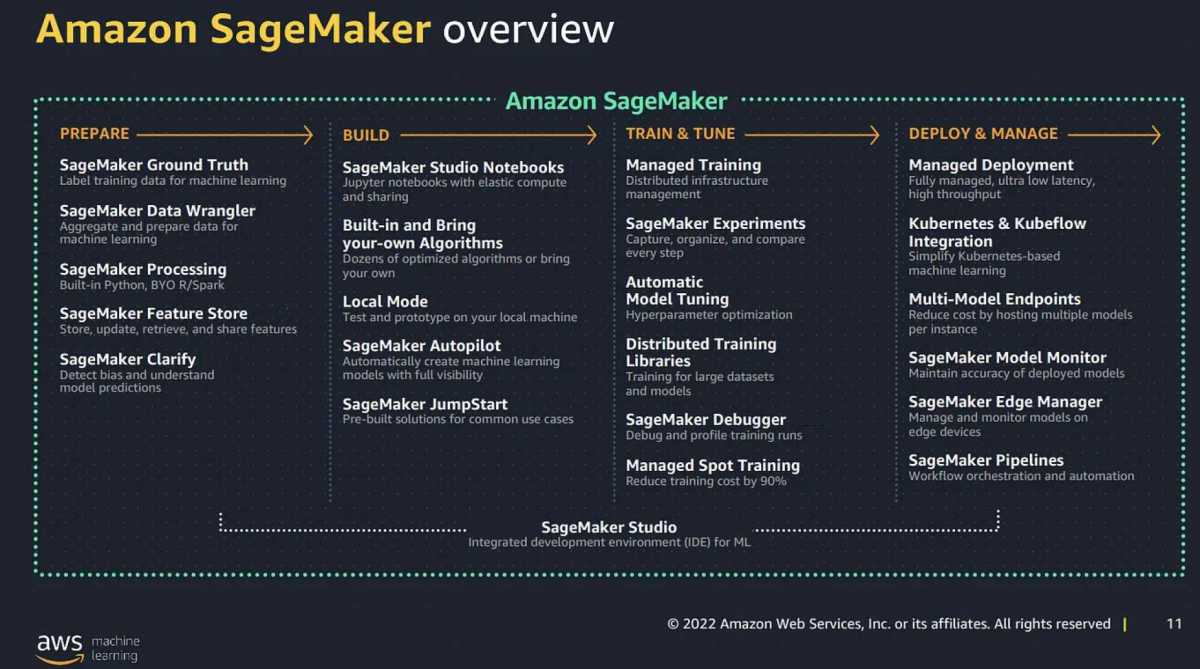
AWS SageMaker is Amazon’s fully managed service that enables developers and data scientists to build, train, and deploy machine learning (ML) models at scale. Unlike traditional ML workflows that require extensive setup and infrastructure management, SageMaker streamlines the entire process—from data preparation to model deployment—into a single, integrated environment.
Core Definition and Purpose
At its core, AWS SageMaker removes the heavy lifting involved in machine learning. It provides a suite of tools that automate repetitive tasks such as setting up compute instances, managing training jobs, tuning hyperparameters, and deploying models into production.
- Eliminates the need for manual infrastructure provisioning.
- Supports popular ML frameworks like TensorFlow, PyTorch, and MXNet.
- Enables rapid prototyping and iteration of ML models.
“SageMaker allows you to focus on the science of machine learning, not the engineering overhead.” — AWS Official Documentation
Who Uses AWS SageMaker?
SageMaker is used by a wide range of professionals across industries:
- Data Scientists: Leverage built-in algorithms and Jupyter notebooks for exploratory analysis.
- ML Engineers: Automate model training pipelines and deploy scalable endpoints.
- Developers: Integrate ML capabilities into applications without deep ML expertise.
- Enterprises: Scale ML initiatives across departments with governance and security controls.
Companies like Toyota, Intuit, and Thomson Reuters use SageMaker to power predictive analytics, customer personalization, and document processing systems.
Key Features of AWS SageMaker That Set It Apart
AWS SageMaker stands out in the crowded ML platform space due to its comprehensive feature set. These tools are designed to accelerate every stage of the ML lifecycle, making it one of the most robust platforms available today.
Jupyter Notebook Integration
SageMaker provides fully managed Jupyter notebook instances, allowing users to write, test, and visualize code in an interactive environment. These notebooks come pre-installed with common data science libraries such as Pandas, NumPy, Scikit-learn, and more.
- Notebooks can be easily shared across teams.
- Supports version control via AWS CodeCommit or GitHub integration.
- Auto-saves work and scales compute resources on demand.
You can launch a notebook instance in minutes and start experimenting with datasets immediately. Learn more about setting up notebooks in the official AWS SageMaker documentation.
Automatic Model Training and Tuning
One of the most time-consuming parts of machine learning is hyperparameter tuning. SageMaker automates this process using Automatic Model Tuning, also known as hyperparameter optimization (HPO).
- Uses Bayesian optimization to find the best combination of parameters.
- Supports both built-in algorithms and custom models.
- Can run multiple training jobs in parallel to speed up convergence.
This feature drastically reduces the trial-and-error phase, helping you achieve higher model accuracy faster than manual tuning.
Built-in Machine Learning Algorithms
SageMaker includes a collection of high-performance, pre-built algorithms optimized for AWS infrastructure. These include:
- Linear Learner (for regression and classification)
- K-Means Clustering
- Random Cut Forest (for anomaly detection)
- BlazingText (for NLP tasks)
- Object2Vec (for embedding generation)
These algorithms are implemented in C++ and optimized for distributed computing, enabling them to handle large datasets efficiently. They can be accessed directly through the SageMaker SDK or console.
AWS SageMaker Studio: The Ultimate ML IDE
SageMaker Studio is a web-based, visual interface that brings all your ML tools, data, and workflows into one place. Think of it as an integrated development environment (IDE) specifically designed for machine learning.
Unified Interface for End-to-End ML Workflow
With SageMaker Studio, you can:
- Create and manage notebooks.
- Visualize data and model performance.
- Track experiments and compare model versions.
- Debug and monitor training jobs in real time.
Everything happens within a single pane of glass, eliminating the need to switch between different tools or services.
Real-Time Collaboration and Sharing
Teams can collaborate seamlessly within SageMaker Studio. Multiple users can work on the same project, share notebooks, and comment on code changes—similar to Google Docs but for ML development.
- Role-based access control ensures security.
- Integration with AWS SSO and IAM policies.
- Supports team-based workflows in enterprise environments.
This makes it ideal for organizations scaling their ML operations across departments.
Integrated Experiment Tracking
SageMaker Studio includes SageMaker Experiments, a tool that automatically tracks parameters, metrics, and artifacts from each training run.
- Compare different model runs side by side.
- Search and filter experiments based on performance.
- Reproduce results with full lineage tracking.
This level of traceability is critical for regulatory compliance and scientific rigor in ML projects.
Data Preparation and Processing with AWS SageMaker
Data is the foundation of any successful machine learning project. AWS SageMaker offers powerful tools to clean, transform, and prepare data at scale—before it even reaches the training phase.
SageMaker Data Wrangler: Simplify Data Preprocessing
SageMaker Data Wrangler is a visual tool that allows users to import, clean, and transform data without writing extensive code.
- Connects to various data sources: S3, Redshift, Snowflake, etc.
- Provides over 300 built-in transformations (e.g., normalization, encoding, imputation).
- Generates Python or PySpark code for reproducibility.
With a drag-and-drop interface, Data Wrangler makes it easy for non-programmers to participate in the ML pipeline.
SageMaker Processing Jobs for Scalable Data Transformation
For larger datasets or complex preprocessing logic, SageMaker offers Processing Jobs. These are serverless compute tasks that run your data transformation scripts on managed infrastructure.
- Use Scikit-learn, Spark, or custom containers.
- Scale automatically based on data volume.
- Integrate with pipelines for automated workflows.
Processing Jobs are especially useful when you need to standardize data before training or generate features for model input.
Integration with AWS Data Services
SageMaker integrates seamlessly with other AWS data services:
- Amazon S3: Store raw and processed datasets securely.
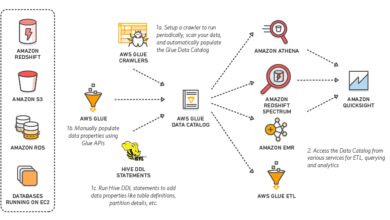
- AWS Glue: Catalog and discover data with a centralized metadata repository.
- Amazon Athena: Query data directly using SQL.
- Amazon Redshift: Analyze structured data at scale.
This ecosystem allows you to build end-to-end data-to-insights pipelines within the AWS cloud.
Model Training and Optimization in AWS SageMaker
Training machine learning models efficiently is a major challenge, especially when dealing with large datasets or deep learning architectures. AWS SageMaker simplifies this process with managed training jobs and advanced optimization techniques.
Managed Training Jobs with Custom and Built-In Algorithms
In SageMaker, you can initiate training jobs using either built-in algorithms or your own custom models packaged in Docker containers.
- Specify instance types (CPU/GPU) based on workload needs.
- Monitor training progress via CloudWatch metrics.
- Pause, resume, or terminate jobs as needed.
The platform handles all the underlying infrastructure, including spinning up instances, loading data, and saving model artifacts to S3.
Distributed Training Support
For deep learning models that require massive computational power, SageMaker supports distributed training across multiple GPUs or instances.
- Horovod integration for TensorFlow and PyTorch.
- Parameter server and data parallelism strategies.
- Automatic sharding of datasets across workers.
This enables faster training times and the ability to handle models with billions of parameters.
Hyperparameter Optimization (HPO)
As mentioned earlier, SageMaker’s HPO uses sophisticated algorithms to search the hyperparameter space efficiently.
- Define ranges for learning rate, batch size, epochs, etc.
- Set objective metrics (e.g., validation accuracy).
- Launch multiple trials to find optimal settings.
Compared to grid or random search, this approach finds better models in fewer iterations, saving both time and cost.
Deploying and Serving Models with AWS SageMaker
Building a model is only half the battle. Deploying it reliably and serving predictions at scale is where many ML projects fail. AWS SageMaker excels in model deployment with flexible, secure, and scalable options.
Real-Time Inference Endpoints
SageMaker allows you to deploy models as real-time endpoints that respond to API calls with low latency.
- Auto-scaling based on traffic patterns.
- Supports HTTPS and IAM authentication.
- Can serve multiple models on a single endpoint using multi-model endpoints.
These endpoints are ideal for applications requiring instant predictions, such as fraud detection or chatbots.
Batch Transform for Offline Predictions
When real-time inference isn’t necessary, SageMaker’s Batch Transform lets you generate predictions on large datasets asynchronously.
- Process thousands of records without keeping an endpoint running.
- Cost-effective for periodic reporting or data enrichment.
- Output results directly to S3 in JSON, CSV, or Parquet format.
This is perfect for scenarios like customer segmentation or risk scoring done nightly.
Model Monitoring and A/B Testing
Once deployed, models can degrade over time due to data drift. SageMaker provides Model Monitor to detect such issues.
- Tracks statistical deviations in input/output data.
- Sends alerts via Amazon CloudWatch.
- Enables retraining triggers based on drift detection.
Additionally, SageMaker supports A/B testing of models, allowing you to route a percentage of traffic to a new version and compare performance before full rollout.
Security, Governance, and Compliance in AWS SageMaker
In enterprise environments, security and compliance are non-negotiable. AWS SageMaker provides robust mechanisms to ensure your ML workflows meet regulatory standards.
IAM Roles and Fine-Grained Access Control
Every SageMaker resource operates under an IAM role that defines what actions it can perform.
- Restrict access to specific S3 buckets.
- Control who can create or delete endpoints.
- Audit actions via AWS CloudTrail.
This principle of least privilege ensures that users and services only have the permissions they absolutely need.
Data Encryption and VPC Isolation
All data in SageMaker is encrypted by default—both at rest and in transit.
- Uses AWS KMS for key management.
- Supports VPC integration to isolate notebook instances and endpoints.
- Blocks public internet access when configured.
This is crucial for handling sensitive data in healthcare, finance, or government sectors.
Audit Trails and Compliance Certifications
SageMaker complies with major standards including:
- GDPR
- HIPAA
- SOC 1/2/3
- PCI DSS
Organizations can leverage these certifications to meet legal and industry requirements when deploying ML solutions.
Cost Management and Pricing Model of AWS SageMaker
Understanding how AWS SageMaker is priced is essential for budgeting and optimizing ML projects. The service follows a pay-as-you-go model with no upfront costs.
Breakdown of SageMaker Costs
The total cost depends on several components:
- Notebook Instances: Hourly rate based on instance type (e.g., ml.t3.medium).
- Training Jobs: Billed per second of compute usage (CPU/GPU/TPU).
- Hosting/Inference: Cost for real-time endpoints or batch transforms.
- Storage: For model artifacts and data in S3.
You only pay for what you use—idle instances still incur charges, so it’s wise to stop notebook instances when not in use.
Cost Optimization Strategies
To reduce expenses:
- Use spot instances for training jobs (up to 70% discount).
- Enable auto-shutdown for notebooks after inactivity.
- Choose appropriate instance types (don’t overprovision).
- Leverage SageMaker Pipelines for efficient orchestration.
AWS also offers SageMaker Studio Lab, a free tier option for learning and small-scale experimentation.
Free Tier and Trial Options
New AWS users get access to the AWS Free Tier, which includes:
- 250 hours of t2.medium or t3.medium notebook instances per month for 2 months.
- 60 hours of ml.t2.medium or ml.t3.medium processing time per month for 2 months.
- Free tier access to SageMaker Studio Lab (no credit card required).
This allows beginners to explore SageMaker without financial risk.
Real-World Use Cases of AWS SageMaker
AWS SageMaker isn’t just a theoretical platform—it’s being used to solve real business problems across industries. Here are some compelling examples.
Fraud Detection in Financial Services
Banks and fintech companies use SageMaker to detect fraudulent transactions in real time.
- Train models on historical transaction data.
- Deploy real-time endpoints to score incoming transactions.
- Use Random Cut Forest algorithm for anomaly detection.
One European bank reduced false positives by 40% while improving detection speed using SageMaker.
Predictive Maintenance in Manufacturing
Manufacturers leverage sensor data from equipment to predict failures before they happen.
- Collect IoT data via AWS IoT Core.
- Process and train models in SageMaker.
- Trigger maintenance alerts via AWS Lambda and SNS.
This proactive approach reduces downtime and maintenance costs significantly.
Personalized Recommendations in E-Commerce
Online retailers use SageMaker to power recommendation engines that boost sales.
- Analyze user behavior and purchase history.
- Train collaborative filtering models.
- Deploy models to personalize product suggestions.
One global e-commerce platform increased conversion rates by 22% after implementing a SageMaker-powered recommender system.
Getting Started with AWS SageMaker: A Step-by-Step Guide
Ready to start using AWS SageMaker? Here’s a practical guide to help you get up and running quickly.
Step 1: Set Up Your AWS Account
If you don’t already have one, sign up at aws.amazon.com. You’ll need a valid email and credit card, though the free tier allows limited usage at no cost.
Step 2: Launch a SageMaker Notebook Instance
Navigate to the SageMaker console and choose “Notebook Instances” > “Create notebook instance.”
- Choose an instance type (start with ml.t3.medium).
- Attach an IAM role with S3 access.
- Click “Create” and wait a few minutes for provisioning.
Step 3: Open Jupyter and Run Your First Script
Once the instance is active, open Jupyter and create a new Python notebook. Try loading a dataset from S3 and training a simple linear model using SageMaker’s built-in algorithm.
Follow the official AWS SageMaker examples on GitHub for step-by-step tutorials.
What is AWS SageMaker used for?
AWS SageMaker is used to build, train, and deploy machine learning models at scale. It’s ideal for tasks like predictive analytics, natural language processing, computer vision, and anomaly detection. Its fully managed nature makes it accessible to both beginners and experts.
Is AWS SageMaker free to use?
SageMaker offers a free tier for new users, including 250 hours of notebook instances and 60 hours of processing time over two months. After that, pricing is pay-as-you-go based on compute, storage, and inference usage. There’s also SageMaker Studio Lab, which is completely free for learning purposes.
How does SageMaker compare to Google AI Platform or Azure ML?
SageMaker offers deeper integration with its cloud ecosystem (like S3, Lambda, IAM) compared to Azure ML or Google Vertex AI. It also provides more built-in algorithms and stronger support for distributed training. However, Google’s platform has strong MLOps tooling, while Azure excels in enterprise integration with Microsoft products.
Can I use SageMaker without knowing machine learning?
While SageMaker simplifies ML workflows, a basic understanding of machine learning concepts is recommended. However, tools like AutoML (Autopilot), Data Wrangler, and pre-built solutions make it possible for developers and analysts with limited ML experience to generate useful models.
Does SageMaker support deep learning frameworks like TensorFlow and PyTorch?
Yes, AWS SageMaker natively supports popular deep learning frameworks including TensorFlow, PyTorch, MXNet, and Chainer. You can use pre-built containers or bring your own custom Docker images for maximum flexibility.
AWS SageMaker is more than just another machine learning platform—it’s a complete ecosystem designed to take you from idea to production with minimal friction. Whether you’re a solo developer or part of a large enterprise team, SageMaker provides the tools, scalability, and security needed to succeed in today’s AI-driven world. From intuitive notebook environments to powerful model deployment and monitoring features, it continues to set the standard for cloud-based ML services. By leveraging its full capabilities, organizations can accelerate innovation, reduce time-to-market, and unlock new business opportunities through intelligent automation.
Recommended for you 👇
Further Reading: